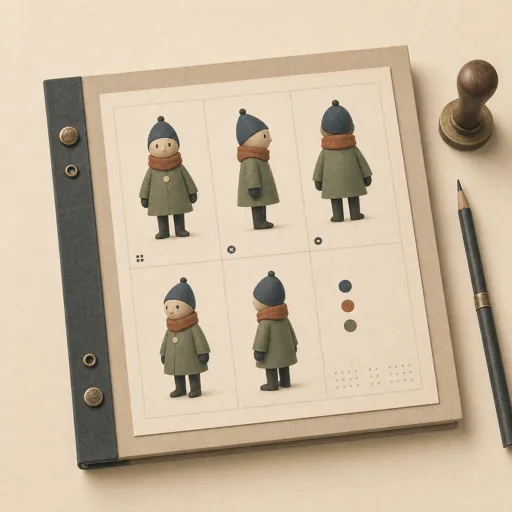
Character Turnaround
Give one character the full turnaround treatment: front, side, back, and three-quarter views generated against the same style anchor, every view manifest-recorded with the seed and prompt that made it — the reference every future sprite leans on. Locks the angle list and the style anchor FIRST, then generates the views as one consistent figure, then writes the records and the summary. Use for character turnarounds, 'we need the knight from all sides', sprite reference sets, model sheets for game characters, and locking a character before animation work.
Steps
Entry step: scope. Each step names the specialist role it wants; the full working prompt is expandable.
- Lock the turnaroundassetsmidentry
character read, angle list, style anchor, consistency rules
Show working prompt
Lock the turnaround before generating a view. Step 1: read the style notes in assets/ and assets/manifest.json — the palette, proportions, and outline rules the library already lives by, and any existing art of this character. Step 2: write the character read — silhouette in one sentence, the palette entries this character owns, and the two or three features every view must carry. Step 3: lock the angle list — front, side, back, and three-quarter at minimum — and the consistency rule: every view is the SAME figure at the same scale in the same style, generated from the same anchor, not four separate drawings. Step 4: write an acceptance-criteria checklist ('all four angles present at the convention names', 'the figure reads as the same character in every view', 'every view recorded in the manifest with its seed and prompt', 'the manifest stays valid and honest'). Call write_task_note with the character + angle list + checklist and write {{workPath}}/scope.md. The deliverable `{{workPath}}/scope.md` lands in the project's artifacts drawer — write it with `write_artifact` and read it back with `read_artifact`; the shipped workspace stays untouched. - Generate the viewsimage-generator
front, side, back, three-quarter — one figure, one style
Show working prompt
Generate the views into assets/characters/<name>/ (lowercase folder named for the character). Step 1: build one base prompt from the character read and the style anchor, then vary ONLY the angle per view — front, side, back, three-quarter — through the project's image capabilities, saved as assets/characters/<name>/<angle>.png. Step 2: keep the figure consistent — same proportions, same palette, same scale in frame; a back view that grew a different haircut fails the whole set. Step 3: after each view, check it against the character read and regenerate what drifted. Step 4: note every seed and prompt as you go — the manifest step persists them. Call write_task_note with the views generated and their seeds.
- Record and summarizedata-analyst
manifest records with seeds and prompts, plus the summary
Show working prompt
Write the turnaround into the library's books. Step 1: append one record per view to the top-level JSON array in assets/manifest.json, keeping existing records untouched — each with exactly these fields: "id" (e.g. knight-front), "file" (the workspace-relative path, e.g. assets/characters/knight/front.png), "size", "tags" (include the character's name and 'turnaround'), "seed", and "prompt" — the seed and prompt are the point: they are how the next sprite gets drawn in the same style. Step 2: re-read the manifest — valid JSON, ids unique, every recorded path resolving to a real file. Step 3: write {{workPath}}/report.md — the character read, the angle list with each view's file, where the seeds live, and the one thing to watch when the sprite work starts. Write {{workPath}}/report.md and call write_task_note with the view count and the manifest total. The deliverable `{{workPath}}/report.md` lands in the project's artifacts drawer — write it with `write_artifact` and read it back with `read_artifact`; the shipped workspace stays untouched. - Evaluatereviewer
Grade the deliverable against every acceptance criterion. All pass → finish; any fail → loop back and fix the gap.
Show working prompt
Open the character's folder under assets/characters/, assets/manifest.json, and {{workPath}}/report.md against {{workPath}}/scope.md and verify every criterion: all four angles exist at the convention names; the views read as ONE figure — same silhouette, palette, and scale, checked against the character read, a turnaround of four different characters is the classic failure; every view's manifest record carries its seed and prompt and every recorded path resolves to a real file; and the report says where the sprite work picks up. Write PASS/FAIL per criterion; on any failure, name the view or record and loop back to generate. The deliverable lives in the project's artifacts drawer — open `{{workPath}}/report.md` with `read_artifact`, not `read_file`. Then route — this is the whole point of the loop: - **Every criterion PASSES →** call `advance_task_step({ ref, stepId: "evaluate", next: "finish" })`. - **Any criterion FAILS →** write the specific gaps to notes, then call `advance_task_step({ ref, stepId: "evaluate", next: "generate" })` to loop back. The builder fixes exactly those gaps. Never route to `finish` while any criterion is unmet. The build phase's completion gate already blocked a grossly-incomplete deliverable; your job is the judgment an automated check cannot make (does it actually work, read well, look right). After ~3 unproductive loops, stop and report DONE_WITH_CONCERNS so the user can step in. - Finishdeveloper
All acceptance criteria met. Stamp a short summary and report DONE.
Show working prompt
Every acceptance criterion passed. Write a one-paragraph DONE summary to task notes via `write_task_note`: what was built, the deliverable path(s), and a one-line confirmation that each criterion is met. Then report DONE.
Triggers
Phrases that suggest this craftbook to a crew.
- do a character turnaround
- we need the character from all sides
- model sheet for the character
- turnaround for the sprite work
- front side and back views
Source
View this craftbook on GitHub · MIT license