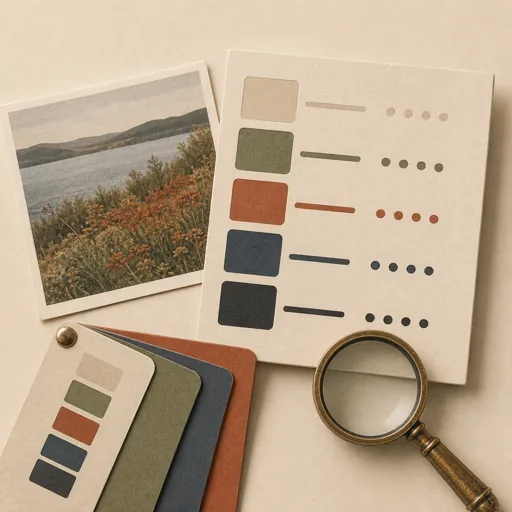
Image Palette Extraction
Extract a usable color palette from an image or a set of images — the dominant and accent colors as hex/RGB with proportions — and emit it as design tokens (CSS variables / JSON) plus a swatch preview, so a brand or theme can be built from a reference photo. Lock FIRST how many colors, the color space and clustering method, and accessibility constraints (e.g. text/background pairs must meet a contrast ratio) because a raw dominant-color dump is rarely directly usable as a theme; then extract, name, and present the palette. Covers color extraction, palette generation, design tokens, theme-from-image, dominant colors, and brand color sampling.
Steps
Entry step: scope. Each step names the specialist role it wants; the full working prompt is expandable.
- Scope the paletteplannerentry
lock count, method, token format, and contrast rules
Show working prompt
1) Identify the source image(s) and the intended use (web theme, brand palette, chart colors). 2) Lock the palette SIZE (e.g. 5-6 swatches: a primary, 2-3 supports, a neutral, an accent) and the extraction method (k-means/median-cut clustering in a perceptual space) plus how to report proportions. 3) Decide the OUTPUT token format: CSS custom properties and/or a JSON tokens file with named roles (--color-primary, etc.). 4) Lock accessibility constraints: at least one text-on-background pair must meet WCAG AA contrast (4.5:1); if the raw extraction misses it, derive a tweaked tint/shade and note it. 5) Write an acceptance-criteria checklist: 'N named swatches with valid hex', 'proportions reported', 'tokens parse (valid CSS/JSON)', 'at least one AA-contrasting text/bg pair', 'colors are sampled from the actual image'. 6) Record scope + checklist via write_task_note AND to {{workPath}}/scope.md. The deliverable `{{workPath}}/scope.md` lands in the project's artifacts drawer — write it with `write_artifact` and read it back with `read_artifact`; the shipped workspace stays untouched. - Build the palettedeveloper
extract, name, token-ize, and preview the palette
Show working prompt
1) Read scope.md. 2) Sample the actual image pixels (prefer a script doing real clustering; otherwise read the image via the vision capability and estimate the dominant colors honestly) to derive the N colors with their approximate proportions. 3) Assign semantic ROLES and names (primary, secondary, accent, neutral, surface) and convert each to hex and RGB. 4) Check the chosen text/background pair for AA contrast; if it fails, derive an adjusted shade and record both the raw and adjusted value. 5) Emit the tokens: a tokens.json (and CSS variables) at the agreed path, AND build a single index.html swatch preview showing each color block with its name, hex, proportion, and a live text-on-color contrast demo. 6) Validate JSON/CSS parse. 7) On a loop-back, fix only named gaps. 8) write_task_note the token + preview paths. The gated deliverable is index.html.
- Evaluatereviewer
Grade the deliverable against every acceptance criterion. All pass → finish; any fail → loop back and fix the gap.
Show working prompt
1) Open index.html and confirm it renders N named swatches each with a valid hex and proportion (PASS/FAIL). 2) Confirm the tokens file parses (valid JSON/CSS) and roles are named (PASS/FAIL). 3) Open the source image next to the palette — are the colors genuinely sampled from it, not arbitrary (PASS/FAIL)? 4) Check the contrast demo: at least one text/background pair meets AA 4.5:1 (PASS/FAIL). 5) Write PASS/FAIL per criterion. Off-image colors, failing contrast, or unparseable tokens → loop back to build. Then route — this is the whole point of the loop: - **Every criterion PASSES →** call `advance_task_step({ ref, stepId: "evaluate", next: "finish" })`. - **Any criterion FAILS →** write the specific gaps to notes, then call `advance_task_step({ ref, stepId: "evaluate", next: "build" })` to loop back. The builder fixes exactly those gaps. Never route to `finish` while any criterion is unmet. The build phase's completion gate already blocked a grossly-incomplete deliverable; your job is the judgment an automated check cannot make (does it actually work, read well, look right). After ~3 unproductive loops, stop and report DONE_WITH_CONCERNS so the user can step in. - Finishdeveloper
All acceptance criteria met. Stamp a short summary and report DONE.
Show working prompt
Every acceptance criterion passed. Write a one-paragraph DONE summary to task notes via `write_task_note`: what was built, the deliverable path(s), and a one-line confirmation that each criterion is met. Then report DONE.
Triggers
Phrases that suggest this craftbook to a crew.
- extract colors from an image
- make a palette from a photo
- get dominant colors
- generate a color theme from an image
- image to design tokens
Source
View this craftbook on GitHub · MIT license