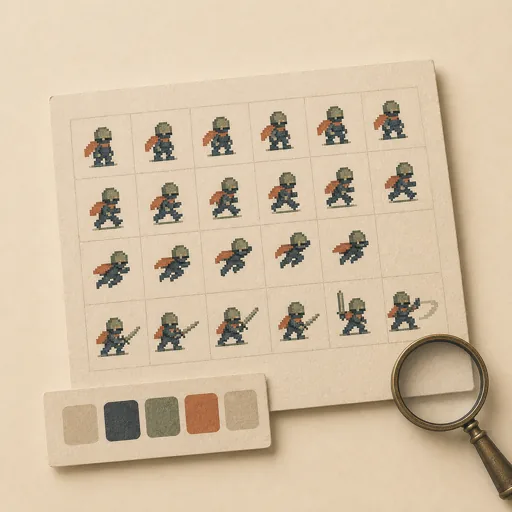
Game Sprite Sheet
Produce a game-ready sprite sheet — a character or object with its animation frames (idle, walk, jump, attack) on a uniform grid — plus the frame metadata (JSON atlas) a game engine needs to slice it. Lock the style and the frame inventory FIRST (cell size, pivot, palette, which animations and how many frames each) because a sprite sheet is only usable if every cell is the same size and the pivot is consistent; then generate the frames and pack them into a sheet with a matching atlas. Covers sprite sheets, game art, animation frames, texture atlases, pixel-art characters, and 2D game assets.
Steps
Entry step: style-scope. Each step names the specialist role it wants; the full working prompt is expandable.
- Style & frame scopegame-designerentry
lock cell size, pivot, palette, and frame inventory
Show working prompt
1) Lock the sprite style: pixel-art vs vector, the uniform CELL size (e.g. 32x32), the pivot/anchor convention (e.g. bottom-center for ground contact), and a tight palette. 2) Enumerate the animation set and frame counts: e.g. idle (2), walk (4), jump (2), attack (3) — name each and its frame order. 3) Decide sheet layout (one animation per row) and the atlas format (a JSON listing each frame's x/y/w/h and animation grouping). 4) Write an acceptance-criteria checklist: 'all cells are exactly NxN', 'pivot is consistent across frames', 'every named animation has its frame count', 'the JSON atlas indexes every frame', 'frames in an animation read as a smooth loop'. 5) Record style + inventory + checklist via write_task_note AND to {{workPath}}/style-scope.md. No art yet. The deliverable `{{workPath}}/style-scope.md` lands in the project's artifacts drawer — write it with `write_artifact` and read it back with `read_artifact`; the shipped workspace stays untouched. - Generate framesimage-generator
draw each animation frame on the uniform cell
Show working prompt
1) Read style-scope.md. 2) Draw each frame on the locked cell size with the consistent pivot — the character's feet (or chosen anchor) must sit at the same point every frame so it doesn't jitter when animated. 3) Keep the palette and silhouette consistent across frames; within an animation, make consecutive frames flow (a clean loop for walk/idle). 4) Produce frames for every named animation and frame count. 5) Save the individual frames and/or the packed sheet into assets/ (e.g. assets/spritesheet.png plus frames if helpful). 6) Sanity-check by mentally flipping through each animation. Good looks like: cells that, played in order, animate smoothly with no pivot drift.
- Pack the sheet + atlasdeveloper
compose the grid sheet and emit the JSON atlas
Show working prompt
1) Compose all frames into a single sprite sheet image laid out one animation per row on the uniform grid (no padding drift between cells). 2) Emit a JSON atlas at the agreed path: for each frame, its name, x/y/w/h on the sheet, and which animation + order it belongs to; group frames by animation. 3) Build a tiny index.html preview that loads the sheet and plays each animation by stepping its frames (a simple setInterval) so the loop is verifiable. 4) Ensure the atlas JSON parses and every frame's rect actually lands on a real cell. 5) On a loop-back, fix only named gaps (misaligned cell, missing frame, wrong rect). 6) write_task_note the sheet path, atlas path, and frame totals. The gated deliverable is the JSON atlas.
- Evaluatereviewer
Grade the deliverable against every acceptance criterion. All pass → finish; any fail → loop back and fix the gap.
Show working prompt
1) Confirm assets/ holds the sprite sheet and atlas.json parses as valid JSON (PASS/FAIL). 2) Check the atlas against style-scope.md: every named animation present with its frame count, every frame rect is NxN on a real cell (PASS/FAIL). 3) Open the preview (or trace the sheet) — do frames in each animation align to a consistent pivot and read as a smooth loop (PASS/FAIL)? 4) Confirm cell sizes are uniform with no drift. 5) Write PASS/FAIL per criterion. Misalignment/missing frames → loop back to pack (or generate if art is wrong). Then route — this is the whole point of the loop: - **Every criterion PASSES →** call `advance_task_step({ ref, stepId: "evaluate", next: "finish" })`. - **Any criterion FAILS →** write the specific gaps to notes, then call `advance_task_step({ ref, stepId: "evaluate", next: "pack" })` to loop back. The builder fixes exactly those gaps. Never route to `finish` while any criterion is unmet. The build phase's completion gate already blocked a grossly-incomplete deliverable; your job is the judgment an automated check cannot make (does it actually work, read well, look right). After ~3 unproductive loops, stop and report DONE_WITH_CONCERNS so the user can step in. - Finishdeveloper
All acceptance criteria met. Stamp a short summary and report DONE.
Show working prompt
Every acceptance criterion passed. Write a one-paragraph DONE summary to task notes via `write_task_note`: what was built, the deliverable path(s), and a one-line confirmation that each criterion is met. Then report DONE.
Triggers
Phrases that suggest this craftbook to a crew.
- make a sprite sheet
- game character sprites
- animation frames for a game
- texture atlas
- pixel art sprite sheet
Source
View this craftbook on GitHub · MIT license